
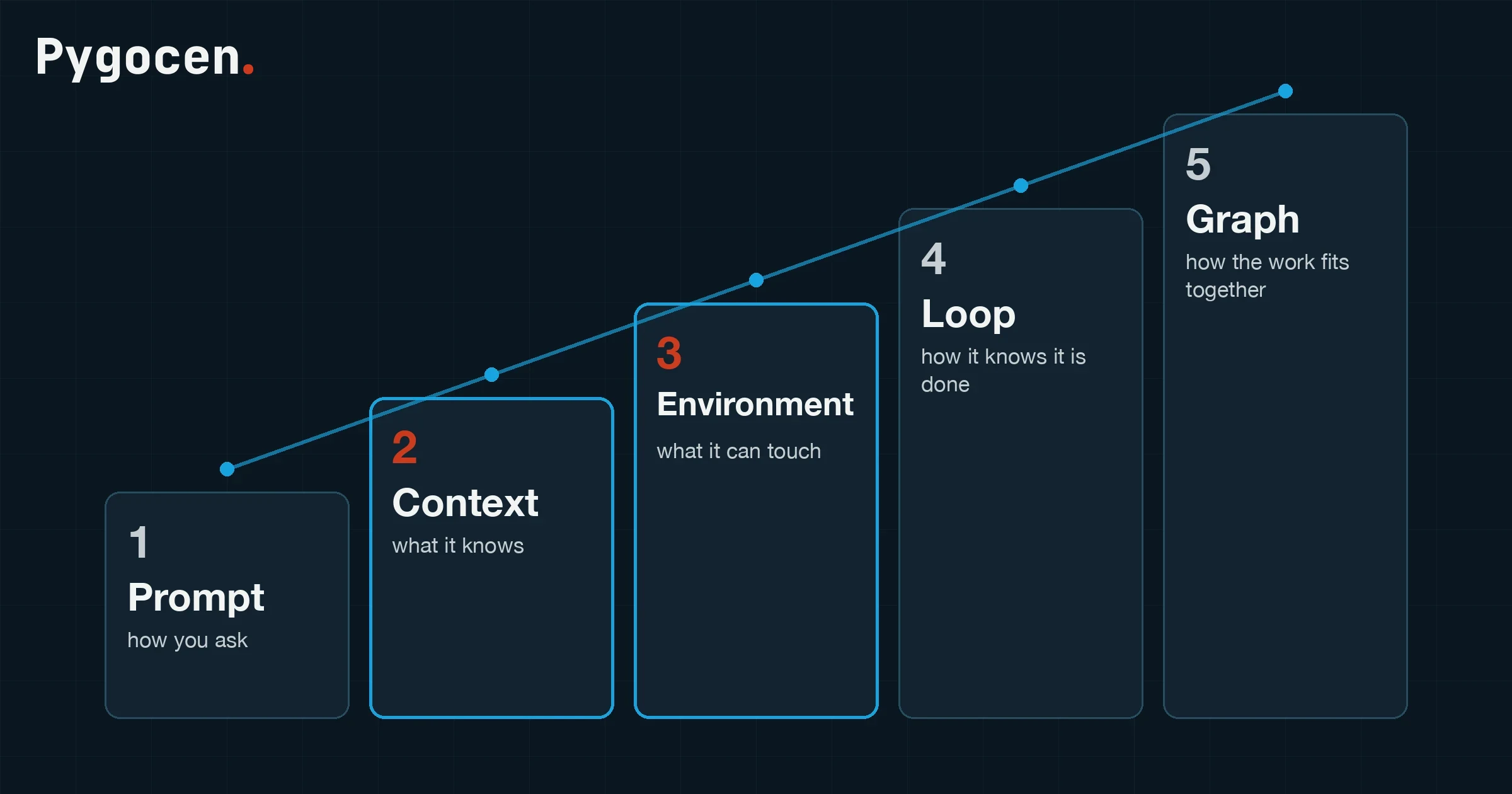
Two years ago prompt engineering was the job of the future. Then it was context engineering. Then the environment, then the loop, and now if you are not talking about graph engineering you are apparently behind. Every one of those terms names a real layer, and every layer answers a different question. The vocabulary moved faster than the explanations did.
We run a dozen AI agents across our own products, and we have been burned at every rung of this ladder. So here is the version we would have wanted: for each layer, what it decides, the failure it fixes, what it looks like in our systems, and the point at which it stops being enough. Then the part the ladder usually leaves out: when not to climb, and the two layers nobody names. Skip to those if you already know the five.
The short version
- Prompt is how you ask. Context is what the agent knows. Environment is what it can touch. Loop is how it knows it is done. Graph is how several pieces of work fit together.
- Climb one layer only when the layer below has stopped being the bottleneck. Most failures blamed on the model are a context or environment problem.
- A loop is only as good as its feedback. Where the feedback is objective, let it run. Where it is a matter of taste, keep a person at the gate.
- The ladder leaves out two things that decide whether any of this survives contact with Monday morning: the environment has to maintain itself, and failures have to reach an agent without a human carrying them.
flowchart TB
  G["5 · Graph<br/>how the work fits together"]
  L["4 · Loop<br/>how it knows it is done"]
  E["3 · Environment<br/>what it can touch"]
  C["2 · Context<br/>what it knows"]
  P["1 · Prompt<br/>how you ask"]
  P --> C --> E --> L --> G
1. Prompt engineering: how you ask
The first phase was about getting better results by saying the thing better. Clearer instructions, a role, a couple of examples, constraints, the exact output format. All of it still matters, and none of it is wasted effort.
The failure it fixes is the vague ask. "Make this faster" gets you a vague answer; "cut the response time of this endpoint below 200 ms without changing its interface, and show the benchmark" gets you work.
Where it stops: a prompt is one message. It cannot carry a codebase, a year of decisions, or the current state of a project. Our rule is simple. A prompt is enough for a task that fits in one message and has no history: reformatting a spreadsheet, drafting a reply, answering a question. The moment a task has a past, the prompt is the smallest part of the problem, and polishing it is polishing the wrong thing.
2. Context engineering: what it knows while it works
An agent does not work well just because it was told clearly what to do. At the right moment it also needs the right information in front of it: the documentation, the conventions, the decisions already taken, the state of the project, the spec. The question changes from "how do I say it" to "what does it need to know and see while it works".
A flawless prompt fed the wrong context fails with great confidence. The output is well formatted, well argued, and wrong.
What this looks like in our work: every repository carries a short index file whose only job is to point. One topic, one owning document, and the index says which. An agent starting a task reads pointers, not a wall of text, and opens the one document that owns the thing it is about to touch. The same index carries the standing rules for that tree.
The trap is that context rots. Three files describe the same process, two of them are stale, and the agent picks one at random. We learned this on our own accounts tree, where a register labelled "single source of truth" had quietly become a second source of truth, and it took a full session to work out which of the two was lying. The fix is a duty, not a document: whenever a method changes, the same piece of work updates the pointer and every place that described the old way. Context you do not maintain is context you cannot trust.
3. Environment engineering: what it can touch
Deciding what to say to the agent is not enough. You have to design the environment it works inside: the tools available to it, the repositories and files it can reach, its permissions, the rules it loads, the reusable skills, the tests it can run, how state and documentation are handled, the procedures around it. The question becomes "which system am I putting this agent into".
The model is the engine. The environment is the rest of the machine. This is where you decide whether the agent behaves like a stranger with a keyboard or like someone who has worked on the project for a year.
In our setup, each agent that runs our automation lives in a fixed working directory with a rules file, a set of skills, a messaging bot of its own, and a permissions mode chosen for its role. Two agents with the same model and the same prompt behave completely differently in two such environments, because one of them can run the tests and read the logs and the other one can only guess.
One thing the usual telling misses: permissions are a design axis, not a checkbox. The blast radius of an agent is the environment you gave it, not the model you picked. The agent that trades our paper account can place orders on exactly one account and nothing else, and that is a property of its environment, not of its instructions.
flowchart TB
  subgraph ENV["The environment"]
    direction LR
    T["Tools"] --- R["Repos and files"] --- P["Permissions"]
    K["Rules and skills"] --- S["Tests and checks"] --- D["State, docs, memory"]
  end
  M["Model"] -->|"works inside"| ENV
  ENV -->|"decides"| O["Stranger with a keyboard<br/>or<br/>someone who knows the project"]
4. Loop engineering: how it knows it is done
At this point a natural question arrives. Why do I have to come back every time to check whether the tests pass, whether the files are right, whether the thing actually works? If the system knows what it has to achieve and can verify the result, it can close the cycle on its own.
That is the loop. In software it is unusually powerful because the feedback is plentiful and relatively objective: tests, compilers, type checkers, linters, browser checks, code review. The design job is a mechanism that moves only toward the result and stops only when the result is verified.
flowchart TD
  G["Goal, stated so it can be checked"] --> A["Act"]
  A --> V["Verify: tests, types, lint, browser, review"]
  V --> Q{"Passed?"}
  Q -->|yes| D["Done. Report it."]
  Q -->|no| B{"Budget left?"}
  B -->|yes| A
  B -->|no| H["Stop and escalate to a person"]
Two rules we hold that the standard telling leaves out.
The loop is only as good as its feedback. Climb only as far as the feedback is objective. A loop that verifies against a test suite converges. A loop that verifies against "does this look good" runs forever, or worse, stops early and calls it done. Where the check is a matter of taste, the person is the verifier, and the loop should hand over rather than pretend.
Every loop needs a budget and an exit. After a number of attempts, or a number of minutes, it stops and asks. A queued question beats a silent failure. The release pipeline for our meditation app works this way: a tagged release runs the tests, builds the signed packages for both stores and pushes them, and a single red test blocks the whole release. It took six rounds to get right, and the lessons are written down as a playbook we reuse, because the second app should not have to pay for them again.
5. Graph engineering: how the work fits together
A loop is not always enough, and it is rarely the right tool for a small app nobody will use. Larger work can be organised as a graph. One node plans, one works on the backend, one on the frontend, one verifies. Some run in parallel; others start only when a condition is met. The question becomes "how do I coordinate several units of work".
flowchart LR
  PL["Plan"] --> BE["Backend"]
  PL --> FE["Frontend"]
  PL --> TS["Tests written first"]
  BE --> IN["Integrate"]
  FE --> IN
  TS --> VR["Verify"]
  IN --> VR
  VR --> HG{"Human gate<br/>has the goal moved?"}
  HG -->|no| SH["Ship"]
  HG -->|yes| PL
Two corrections worth making to the hype. A graph is not a loop that grew up; it is a different thing, and a node in a graph can perfectly well contain a loop. And using an elaborate orchestrator does not make the work more advanced. It makes it more expensive to run and harder to reason about, which is a price worth paying only when the work is genuinely parallel and genuinely long.
In our work the graph shows up in two places. An overnight research pipeline splits a job into shards, primes caches in parallel, watches the disk floor, and starts the next stage only when the previous one lands. And a code review runs several reviewers in parallel, one per concern, with each finding checked by a separate agent the moment it lands, so nothing waits on the slowest reviewer. Both are graphs because the work is genuinely parallel. Neither would be improved by a bigger orchestrator.
When not to climb
Removing the human from the cycle is the right move when the goal is fixed, well defined, and the job is to reach it fast. Digital product work is often not like that. A large part of it is exploration: the process itself is how you understand the goal, change it, and move it. There is no straight line from prompt to context to environment to loop to graph, and a team that treats the ladder as a maturity model will automate itself past the point where anyone still knows what the product is for.
Orchestration is on its way to becoming what microservices were a decade ago: adopted for the slide, paid for in the on-call rota. The parallel is exact. Microservices solved a scaling problem most teams did not have and created a coordination problem every team then had. A graph of agents does the same when the work was never parallel in the first place. A single agent with good context and a tight loop outperforms a fleet with neither, and it is a lot easier to find out why it did something.
flowchart TD
  S(["What shape is the task?"]) --> O{"One message, no history?"}
  O -->|yes| L1["Prompt"]
  O -->|no| F{"Can a machine check the result?"}
  F -->|no| L2["Context + environment,<br/>a person verifies"]
  F -->|yes| PR{"Parallel, hours long,<br/>clear dependencies?"}
  PR -->|no| L3["Context + environment<br/>+ a loop with a budget"]
PR -->|yes| L4["Graph, with a human gate"]| Task shape | Layer | Who checks the result |
|---|---|---|
| One-off, fits in a message, no history | Prompt | You, by reading it |
| Recurring task inside a codebase or a running system | Context + environment | You, with the agent's own checks |
| Result a machine can verify (tests, types, builds, browser) | Loop, with a budget | The checks; you on escalation |
| Parallel, hours long, clear dependencies | Graph, with a human gate | The checks, then a person at the gate |
| Exploratory, the goal may change | Context + environment, person in the loop | A person, every step |
What the ladder leaves out
Two more layers decide whether any of the above survives a month of real use. Neither has a fashionable name.
The environment has to maintain itself. Memory, documentation and rules drift the moment someone renames a folder or changes a method. Our rule is that the same piece of work that changes how something is done also updates the index and every document that described the old way, and that a trap, once hit, is written down with the tell that reveals it, not just the fix. The tell is what stops the next agent from making the same mistake. "The total did not move after adding a cost" is worth more than the one-line fix that followed it.
Failures have to reach an agent. A loop that only runs when a person starts it is a person doing the work of a scheduler. On our Mac, every scheduled job that fails writes to a ledger; a forwarder watches the ledger and types the failure into an always-on agent session; the agent says it is on it, investigates, fixes what is safely fixable, and reports in the founder's chat. Where it needs a decision only a person can make, it sends one message and keeps working through the rest of the queue. A daily self-test proves the wire still reaches an agent, and the health check goes red if it does not.
sequenceDiagram
  participant J as Scheduled job
  participant L as Alarm ledger
  participant F as Forwarder
  participant A as Agent session
  participant T as Founder's chat
  J->>L: exit non-zero, record it
  F->>L: poll every 30 s
  F->>A: type the alarm in (only when the input box is free)
  A->>T: "On it"
  A->>A: read logs, reproduce, fix, verify
  A->>T: what happened, what changed
  A-->>T: one question, if a decision is needed
  Note over F,A: a daily self-test proves the wire still works
That wire earned its keep the morning we wrote this. A one-off dialog in the agent tooling had stranded every session at the 06:00 restart. The forwarder, correctly, refused to type into it, the daily proof failed, and the health check went red. The agent that picked up the alarm found the dialog, cleared it on every session, taught the forwarder and the health check to recognise that shape of dialog by its structure rather than its wording, and, while checking its own fix, noticed that alarms had been arriving with their first thousand characters cut off for four weeks. Both fixes were live before ten. Nobody had to notice anything.
The costs, side by side
| Layer | You are designing | Feedback comes from | Cost per task | Human checkpoints |
|---|---|---|---|---|
| Prompt | The ask | Your reading of the answer | One call | Every task |
| Context | What the agent sees | Your reading, plus the docs | One call, larger | Every task |
| Environment | What the agent can do | Its own tools and checks | Several calls | Per task, fewer |
| Loop | The stop condition | Objective checks | Bounded by the budget | On escalation |
| Graph | The dependencies | Checks per node, then a gate | Multiplied by the nodes | At the gate |
Each step up multiplies the tokens and divides the checkpoints. That is the trade, and it is a good trade exactly where the feedback is objective and the goal is still.
What we do with this
At Pygocen most of the work is the middle of the ladder: giving an agent the right context and the right environment for a specific business, adding a loop where a machine can check the result, and keeping a person at the gate where it cannot. The five layers are a useful map. Knowing which one a problem actually needs is the work, and it is usually one lower than the one on the slide.
If you are deciding that for your own team, that is a conversation we have most weeks. Get in touch, or see how we automate the busywork.